reCAPTCHA v3 Enterprise
The task is executed through our own proxy servers. There are no additional costs for proxies — their usage is already included in the service price.
This section contains a description of the task for solving Google reCAPTCHA v3 Enterprise.
reCAPTCHA v3 Enterprise operates entirely in the background and does not require the user to perform any actions. The system analyzes behavioral and technical signals from the page visitor and generates a risk assessment for each request. Based on this information, the site decides whether the action is allowed, using a trust score that typically ranges from 0.1 to 0.9.
Task Type
| Task Type | Description |
|---|---|
RecaptchaV3EnterpriseTaskProxyless | Solve without proxy (uses built-in proxies) |
Note: You can also solve reCAPTCHA v3 Enterprise using the reCAPTCHA v3 task type by specifying the
isEnterprise parameter.
Request Parameters
| Parameter | Type | Required | Description |
|---|---|---|---|
type |
String | Required | RecaptchaV3EnterpriseTaskProxyless |
websiteURL |
String | Required | Address of a webpage with Google reCAPTCHA. |
websiteKey |
String | Required | The reCAPTCHA v3 site key on the target page.https://www.google.com/recaptcha/enterprise.js?render=THIS_ONE |
minScore |
Double | Optional | Can have a value from 0.1 to 0.9. |
pageAction |
String | Optional | The action parameter value passed by the reCAPTCHA widget to Google, which is visible to the site owner during server-side verification. Default value: verify.Example: grecaptcha.execute('site_key', {action:'login_test'}) |
enterprisePayload |
Object | Optional | Additional parameters passed to the reCAPTCHA Enterprise widget. |
Create Task
Request
POST https://captcha69.com/createTask
Content-Type: application/json

{
  "clientKey": "max1_YOUR_API_KEY",
  "task": {
    "type": "RecaptchaV3EnterpriseTaskProxyless",
    "websiteURL": "https://example.com",
    "websiteKey": "6Le0xVgUAAAAAIt20XEB4rVhYOODgTl00d4TuRTE",
    "minScore": 0.7
  }
}
Response
{
  "errorId": 0,
  "taskId": 407533072
}
Get Task Result
Warning! On some websites, it is important that the UserAgent matches the one used when solving the captcha. Therefore, if a UserAgent is returned along with the token, always apply it when submitting the form or confirming the solution on the target page.
Use the getTaskResult method to request the answer for reCAPTCHA v3 Enterprise. You will get a response within a 10-30 second period depending on service workload.
Request
POST https://captcha69.com/getTaskResult
Content-Type: application/json

{
  "clientKey": "max1_YOUR_API_KEY",
  "taskId": 407533072
}
Response
{
  "errorId": 0,
  "status": "ready",
  "solution": {
    "gRecaptchaResponse": "3AHJ_VuvYIBNBW5yyv0zRYJ75VkOKvhKj9_xGBJKnQimF72rfoq3Iy-DyGHMwLAo6a3"
  }
}
For some websites, the response may include userAgent:
{
  "errorId": 0,
  "status": "ready",
  "solution": {
    "gRecaptchaResponse": "3AHJ_VuvYIBNBW5yyv0zRYJ75VkOKvhKj9_xGBJKnQimF72rfoq3Iy-DyGHMwLAo6a3",
    "userAgent": "Mozilla/5.0 (Macintosh; Intel Mac OS X 10_15_7) AppleWebKit/537.36 (KHTML, like Gecko) Chrome/138.0.0.0 Safari/537.36"
  }
}
Solution Properties
| Property | Type | Description |
|---|---|---|
gRecaptchaResponse |
String | Hash which should be inserted into reCAPTCHA submit form in <textarea id="g-recaptcha-response"></textarea>. It has a length of 500 to 2190 bytes. |
Differences Between reCAPTCHA v3 Enterprise and Standard reCAPTCHA v3
| Feature | reCAPTCHA v3 | reCAPTCHA v3 Enterprise |
|---|---|---|
| Script URL | https://www.google.com/recaptcha/api.js?render=site_key |
https://www.google.com/recaptcha/enterprise.js?render=site_key |
| Identification on the site | iframe and script use standard v3 URLs | iframe and script include enterprise in the URL (/enterprise.js, /enterprise/anchor, /enterprise/reload) |
Practical way to identify:
- Open the page with the captcha and enable DevTools → Network.
- Locate the reCAPTCHA scripts:
- If the URL contains
/enterprise.js— it's v3 Enterprise. - If the URL contains
/api.js— it's standard v3.
- If the URL contains
- You can also inspect the reCAPTCHA iframe: in Enterprise, the iframe URL contains
/enterprise/anchor, whereas in standard v3 it contains/anchor.
Finding Parameters
websiteKey
Manually:
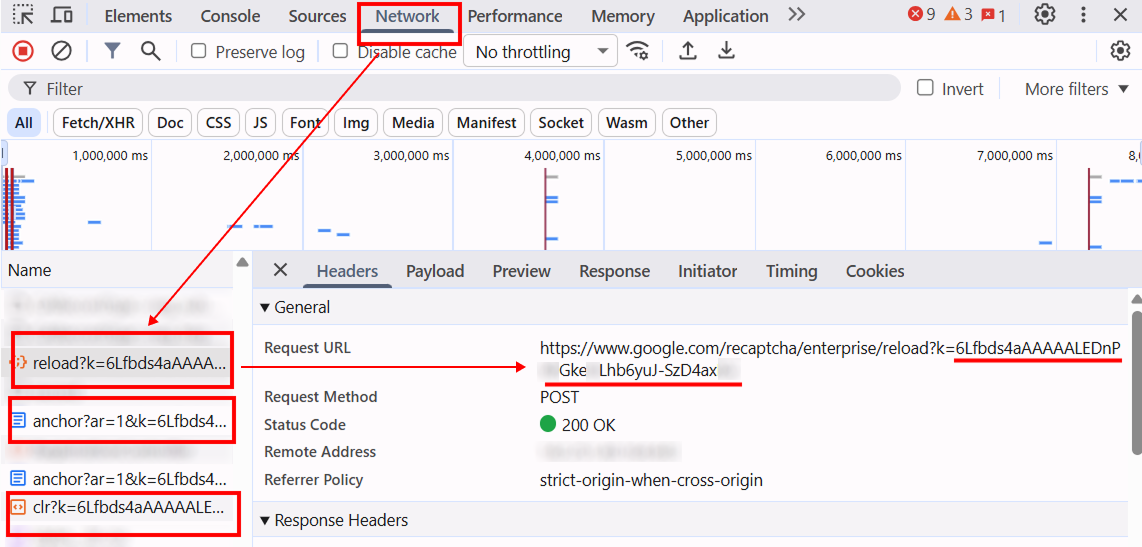
- Open the page on your website where the captcha is displayed.
- Open Developer Tools in your browser and go to the Network tab.
- Reload the page and look for requests such as:
https://www.google.com/recaptcha/enterprise/anchor?ar=1&k=https://www.google.com/recaptcha/enterprise.js?render=https://www.google.com/recaptcha/enterprise/reload?k=
- The k parameter in these URLs is the
websiteKey.
Code Examples
JavaScript (Browser) - Extract websiteKey
const iframe = document.querySelector('iframe[src*="recaptcha"]');

if (iframe) {
  const src = iframe.src;
  const k = new URL(src).searchParams.get('k');
  console.log('Site key:', k);
} else {
  console.log('reCAPTCHA iframe not found');
}
JavaScript (Node.js) - Extract websiteKey
const { chromium } = require("playwright");

(async () => {
  const browser = await chromium.launch({ headless: false });
  const page = await browser.newPage();

  // Replace with your target URL
  await page.goto("https://example.com/", {
    waitUntil: "load",
  });

  await page.waitForSelector('iframe[src*="recaptcha"]', { timeout: 10000 });

  const k = await page.evaluate(() => {
    const iframe = document.querySelector('iframe[src*="recaptcha"]');
    if (!iframe) return null;
    return new URL(iframe.src).searchParams.get("k");
  });

  console.log("Site key:", k);

  await browser.close();
})();
Python - Extract websiteKey
from playwright.sync_api import sync_playwright

with sync_playwright() as p:
    browser = p.chromium.launch(headless=False)
    page = browser.new_page()

    # Replace with your target URL
    page.goto("https://www.example.com/", wait_until="load")

    page.wait_for_selector('iframe[src*="recaptcha"]', timeout=10000)

    k = page.evaluate("""
    () => {
        const iframe = document.querySelector('iframe[src*="recaptcha"]');
        if (!iframe) return null;
        return new URL(iframe.src).searchParams.get("k");
    }
    """)

    print("Site key:", k)
    browser.close()