ImageToText
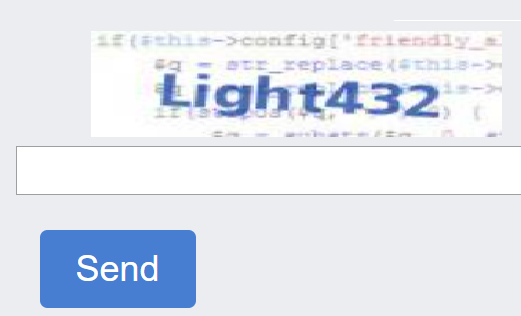
This is a regular captcha, which is an image with text to be entered into the corresponding line.
Using proxy servers is not required for this task.
Request Parameters
| Parameter | Type | Required | Description |
|---|---|---|---|
type |
String | Required | ImageToTextTask |
body |
String | Required | File body encoded in base64. Make sure to send it without line breaks. |
recognizingThreshold |
Integer | Optional | Captcha recognition threshold with a possible value from 0 to 100. For example, if recognizingThreshold was set to 90 and the task was solved with a confidence of 80, you won't be charged. In this case you will get ERROR_CAPTCHA_UNSOLVABLE. |
case |
Boolean | Optional | true - if captcha is case sensitive. |
numeric |
Integer | Optional | 1 - if captcha contains numbers only. Possible values: 0, 1. |
math |
Boolean | Optional | false - undefined; true - if captcha requires a mathematical operation (for example: captcha "2 + 6 =" will return a value of 8). Important: Do not use math: true for the captcha_math module. |
Create Task
Request
POST https://captcha69.com/createTask
Content-Type: application/json

{
  "clientKey": "max1_YOUR_API_KEY",
  "task": {
    "type": "ImageToTextTask",
    "body": "BASE64_BODY_HERE!"
  }
}
Response
{
  "errorId": 0,
  "taskId": 407533072
}
Get Task Result
Use the getTaskResult method to get the captcha solution. Depending on the system load, you will receive an answer within an interval from 300 ms to 6 s.
Request
POST https://captcha69.com/getTaskResult
Content-Type: application/json

{
  "clientKey": "max1_YOUR_API_KEY",
  "taskId": 407533072
}
Response
{
  "errorId": 0,
  "status": "ready",
  "solution": {
    "text": "answer"
  }
}
Solution Properties
| Property | Type | Description |
|---|---|---|
text |
String | Captcha answer. |
How to Find the Base64 Image
Manually
- Open your website where the captcha appears in the browser.
- Right-click on the captcha element and select Inspect.
base64
Locate the required element in the DOM tree and hover over it — the base64-encoded image will be displayed directly in the element's attributes:

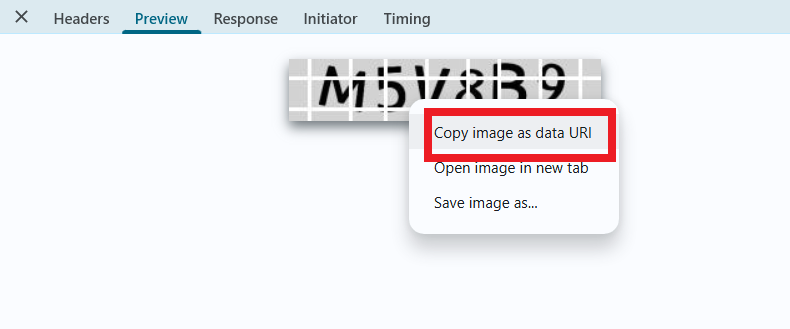
If the image references an external URL rather than containing base64-encoded data, you can find it in the network requests (Network). Right-click on the relevant request and select Copy image as data URI. This will copy the base64-encoded image data to your clipboard.
Automatically
To automate parameter extraction, you can retrieve them via a browser (regular or headless, e.g., using Playwright) or directly from HTTP requests. Since dynamic parameter values are short-lived, it is recommended to use them immediately after retrieval.
The provided code snippets are basic examples for learning how to extract the required parameters. The exact implementation will depend on your captcha page, its structure, and the HTML elements and selectors used.
Code Examples
Extract Base64 Image
JavaScript (Browser)
(async () => {
  const img = document.querySelector('img'); // Example selector

  const imageUrl = img.src;

  const response = await fetch(imageUrl);

  if (!response.ok) {
    throw new Error("Failed to load image");
  }

  const buffer = await response.arrayBuffer();

  // Convert binary data to base64
  const base64Image = btoa(String.fromCharCode(...new Uint8Array(buffer)));

  console.log(base64Image);
})();
JavaScript (Node.js)
(async () => {
  const imageUrl = "https://example/img/.jpg"; // Image URL

  const response = await fetch(imageUrl);

  if (!response.ok) {
    throw new Error("Failed to load image");
  }

  const buffer = await response.arrayBuffer();

  // Convert data to base64
  const base64Image = Buffer.from(buffer).toString("base64");

  console.log(base64Image);
})();
Python
import requests
import base64

# Image URL
image_url = "https://example/img.jpg"

response = requests.get(image_url)

if response.status_code == 200:
    # Convert image binary data to base64
    base64_image = base64.b64encode(response.content).decode('utf-8')

    print(base64_image)
else:
    print("Failed to load image")