Friendly Captcha

Built-in proxies are used by default — their cost is already included in the service. You only need to specify your own proxies in cases where the website does not accept the token or access to the built-in services is restricted.
If you are using a proxy, please use a proxy with username and password authentication.
Request Parameters
| Parameter | Type | Required | Description |
|---|---|---|---|
type |
String | Required | CustomTask |
class |
String | Required | friendly |
websiteURL |
String | Required | Full URL of the page with the captcha. |
websiteKey |
String | Required | Friendly Captcha key (sitekey). |
metadata.apiGetLib |
String | Required | URL of the JS file. Specify the URL depending on the captcha version:
|
userAgent |
String | Optional | Browser User-Agent. Pass only a valid UA from Windows OS. |
proxyType |
String | Optional | http - regular http/https proxy; https - try this option only if "http" doesn't work; socks4 - socks4 proxy; socks5 - socks5 proxy. |
proxyAddress |
String | Optional | IPv4/IPv6 proxy IP address. Not allowed: transparent proxies or local machine proxies. |
proxyPort |
Integer | Optional | Proxy port. |
proxyLogin |
String | Optional | Proxy server login. |
proxyPassword |
String | Optional | Proxy server password. |
apiGetLib by Version
Use the apiGetLib parameter value in metadata according to the Friendly Captcha version.
V1 Example
"apiGetLib": "https://cdn.jsdelivr.net/npm/[email protected]/widget.module.min.js"V2 Example
"apiGetLib": "https://cdn.jsdelivr.net/npm/@friendlycaptcha/[email protected]/site.min.js"Create Task - Without Proxy
Request
POST https://captcha69.com/createTask
Content-Type: application/json

{
  "clientKey": "max1_YOUR_API_KEY",
  "task": {
    "type": "CustomTask",
    "class": "friendly",
    "websiteKey": "FFMGEMAD2K3JJ35P",
    "websiteURL": "https://example.com",
    "userAgent": "userAgentPlaceholder",
    "metadata": {
      "apiGetLib": "https://cdn.jsdelivr.net/npm/[email protected]/widget.module.min.js"
    }
  }
}
Response
{
  "errorId": 0,
  "taskId": 407533077
}
Create Task - With Proxy
Request
POST https://captcha69.com/createTask
Content-Type: application/json

{
  "clientKey": "max1_YOUR_API_KEY",
  "task": {
    "type": "CustomTask",
    "class": "friendly",
    "websiteKey": "FFMGEMAD2K3JJ35P",
    "websiteURL": "https://example.com",
    "userAgent": "userAgentPlaceholder",
    "metadata": {
      "apiGetLib": "https://cdn.jsdelivr.net/npm/[email protected]/widget.module.min.js"
    },
    "proxyType": "http",
    "proxyAddress": "8.8.8.8",
    "proxyPort": 8080,
    "proxyLogin": "proxyLoginHere",
    "proxyPassword": "proxyPasswordHere"
  }
}
Response
{
  "errorId": 0,
  "taskId": 407533077
}
Get Task Result
Use the getTaskResult method to obtain the Friendly Captcha solution. The token format in the response depends on the captcha version used on the website:
- V1:
"56a3727f1f9ae4f339c8e512913cd6f8.ac7W...MAKgAAAN+MAQArAAAAjxMBACwAAAB5QgAA.AgAB" - V2:
"AQQA.8Q2TbgK_..._pknXDweJjKT2qwmroOhHcZsU4dHyu-jaGIPx9k7432p_num13buuTu6n4lVA=="
Request
POST https://captcha69.com/getTaskResult
Content-Type: application/json

{
  "clientKey": "max1_YOUR_API_KEY",
  "taskId": 407533077
}
Response
{
  "errorId": 0,
  "errorCode": null,
  "errorDescription": null,
  "status": "ready",
  "solution": {
    "data": {
      "token": "56a3727f1f9ae4f339c8e512913cd6f8.ac7W...MAKgAAAN+MAQArAAAAjxMBACwAAAB5QgAA.AgAB"
    }
  }
}
Solution Properties
| Property | Type | Description |
|---|---|---|
data.token |
String | The captcha solution token. Insert into the corresponding field on the target website. |
Token Field Mapping
The obtained token value should be inserted into the corresponding field:
| Version | Token Field |
|---|---|
| V1 | input.frc-captcha-solution |
| V2 | input.frc-captcha-response |
How to Find the Sitekey
V1
For V1, this parameter can be found in network requests by filtering them with the keywords sitekey or puzzle?sitekey=:

V2
For V2, use search with the keywords sitekey or data-sitekey in network requests or in the page source elements:
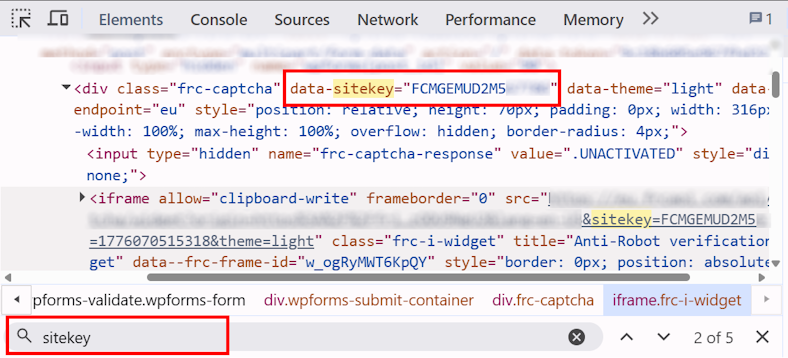
How to Determine Friendly Captcha Version
Friendly Captcha can be used in two main versions: V1 and V2. The version can be identified by loaded scripts or network requests.
Friendly Captcha V1
Used if the following scripts are present on the page:
widget.min.js
widget.module.min.js
Or if puzzle?sitekey= appears in network requests:

To determine the client version:
- Open the found
puzzle?sitekey=...request and go to Headers → Request Headers - Find the
x-frc-clientheader:

The header contains the Friendly Captcha client version. Example values: 0.9.14, 0.9.19, etc.
After determining the version, insert it into the CDN link:
https://cdn.jsdelivr.net/npm/friendly-challenge@<VERSION>/widget.module.min.jsFor example, if x-frc-client = 0.9.14, use:
https://cdn.jsdelivr.net/npm/[email protected]/widget.module.min.jsFriendly Captcha V2
If site.min.js is loaded on the site, it means Friendly Captcha V2 is used.

Pass the site.min.js URL into the apiGetLib parameter when creating a task:

Automatic Version Detection
JavaScript - Detect Friendly Captcha Version
(async function detectFriendlyCaptcha() {
  const result = {
    version: null,
    clientVersion: null,
    indicators: [],
    siteMinJsLinks: [],
    detectedCdn: null
  };

  const scripts = Array.from(document.scripts).map(s => s.src);

  for (const src of scripts) {
    if (!src) continue;

    if (src.includes("widget.min.js") || src.includes("widget.module.min.js")) {
      result.version = "V1";
      result.detectedCdn = src;
      result.indicators.push("Found widget script");
    }

    const match = src.match(/friendly-challenge@(\d+\.\d+\.\d+)/);
    if (match) {
      result.clientVersion = match[1];
      result.version = "V1";
      result.detectedCdn = src;
      result.indicators.push("Detected CDN version");
    }
  }

  const puzzleElements = document.querySelectorAll(
    '[id*="friendly"], [class*="frc"], iframe[src*="friendly"]'
  );

  if (puzzleElements.length > 0) {
    result.indicators.push("Found captcha DOM elements");
    if (!result.version) result.version = "V1";
  }

  const resources = performance.getEntriesByType("resource");

  for (const r of resources) {
    if (r.name.includes("puzzle?sitekey")) {
      result.version = "V1";
      result.indicators.push("Found puzzle?sitekey request");
    }
  }

  for (const src of scripts) {
    if (!src) continue;

    if (src.includes("site.min.js")) {
      result.version = "V2";
      result.detectedCdn = src;
      result.indicators.push("Found site.min.js");
      result.siteMinJsLinks.push(src);
    }
  }

  if (!result.version) {
    result.version = "Unknown (not detected)";
  }

  console.log("FriendlyCaptcha Detection Result:");
  console.log(result);

  return result;
})();