Binance - Binance Captcha
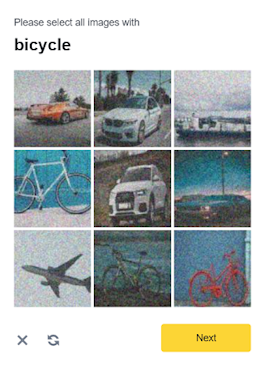
Attention!
Built-in proxies are used by default — their cost is already included in the service. You only need to specify your own proxies in cases where the website does not accept the token or access to the built-in services is restricted.
If you are using a proxy, please use a proxy with username and password authentication.
Use only to log in with your account.
Built-in proxies are used by default — their cost is already included in the service. You only need to specify your own proxies in cases where the website does not accept the token or access to the built-in services is restricted.
If you are using a proxy, please use a proxy with username and password authentication.
Use only to log in with your account.
IMPORTANT: Some parameter values are dynamic — they change with each render of the page using Binance. Extract them immediately before creating the task to avoid errors during solving.
Request Parameters
| Parameter | Type | Required | Description |
|---|---|---|---|
type |
String | Required | BinanceTask |
websiteURL |
String | Required | The address of the main page where the captcha is solved. |
websiteKey |
String | Required | A unique parameter for your website's section. The value of the parameter bizId, bizType, or bizCode. It can be taken from the traffic. |
validateId |
String | Required | A dynamic key. The value of the parameter validateId, securityId, or securityCheckResponseValidateId. It can be taken from the traffic. |
userAgent |
String | Optional | Browser User-Agent. Pass only a valid UA from Windows OS. |
proxyType |
String | Optional | http - regular http/https proxy; https - try this option only if "http" doesn't work; socks4 - socks4 proxy; socks5 - socks5 proxy. |
proxyAddress |
String | Optional | IPv4/IPv6 proxy IP address. Not allowed: transparent proxies or local machine proxies. |
proxyPort |
Integer | Optional | Proxy port. |
proxyLogin |
String | Optional | Proxy server login. |
proxyPassword |
String | Optional | Proxy server password. |
Create Task - Without Proxy
Request
POST https://captcha69.com/createTask
Content-Type: application/json

{
  "clientKey": "max1_YOUR_API_KEY",
  "task": {
    "type": "BinanceTask",
    "websiteURL": "https://example.com",
    "websiteKey": "login",
    "validateId": "cb0bfefa598b4c3887661fde54ecd57b",
    "userAgent": "userAgentPlaceholder"
  }
}
Response
{
  "errorId": 0,
  "taskId": 407533072
}
Create Task - With Proxy
Request
POST https://captcha69.com/createTask
Content-Type: application/json

{
  "clientKey": "max1_YOUR_API_KEY",
  "task": {
    "type": "BinanceTask",
    "websiteURL": "https://example.com",
    "websiteKey": "login",
    "validateId": "cb0bfefa598b4c3887661fde54ecd57b",
    "userAgent": "userAgentPlaceholder",
    "proxyType": "http",
    "proxyAddress": "8.8.8.8",
    "proxyPort": 8080,
    "proxyLogin": "proxyLoginHere",
    "proxyPassword": "proxyPasswordHere"
  }
}
Response
{
  "errorId": 0,
  "taskId": 407533072
}
Get Task Result
Use the getTaskResult method to obtain the Binance solution.
Request
POST https://captcha69.com/getTaskResult
Content-Type: application/json

{
  "clientKey": "max1_YOUR_API_KEY",
  "taskId": 407533072
}
Response
{
  "errorId": 0,
  "status": "ready",
  "solution": {
    "token": "captcha#09ba4905a79f44f2a99e44f234439644-ioVA7neog7eRHCDAsC0MixpZvt5kc99maS943qIsquNP9D77",
    "userAgent": "userAgentPlaceholder"
  }
}
Solution Properties
| Property | Type | Description |
|---|---|---|
token |
String | The captcha solution token. |
userAgent |
String | User-Agent used during solving. |
How to Get websiteKey and validateId
Enable Developer Tools, go to the Network tab, activate the CAPTCHA, and look at the requests. Some of them will contain the required parameter values.
For example, the parameters:
bizCode: "CMC_register",
securityId: "09295759baca4d4fbeae80d9ffeaefd8"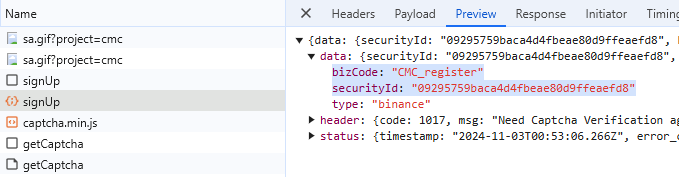
or
bizId: "CMC_register",
securityCheckResponseValidateId: "09295759baca4d4fbeae80d9ffeaefd8"
or
bizType: "login",
validateId: "ff965ea6216b46f3825fa827ecaf297f"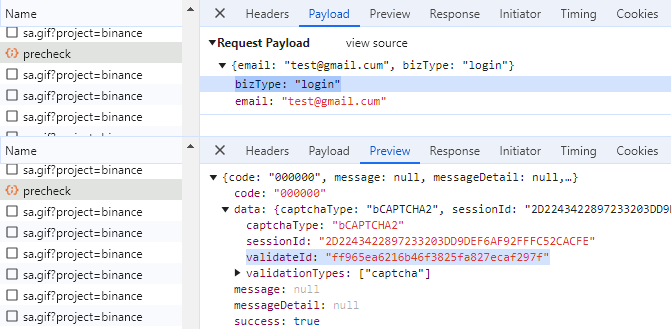
or
bizId: "login",
securityCheckResponseValidateId: "ff965ea6216b46f3825fa827ecaf297f"
The necessary parameters to solve the captcha can also be obtained by executing JavaScript:
let originalBCaptcha = window.BCaptcha;
let BCaptchaData;

Object.defineProperty(window, 'BCaptcha', {
  get: function() {
    return function(args) {
      const BCaptcha = new originalBCaptcha(args);
      let BCaptchaShow = BCaptcha.__proto__.show;

      BCaptcha.__proto__.show = function(args) {
        BCaptchaData = args;
        return 1;
      };

      return BCaptcha;
    };
  }
});
Then, you can retrieve the parameters, for example, like this: BCaptchaData.securityCheckResponseValidateId.